Resultados:
Video: PetsD1TeC1.avi
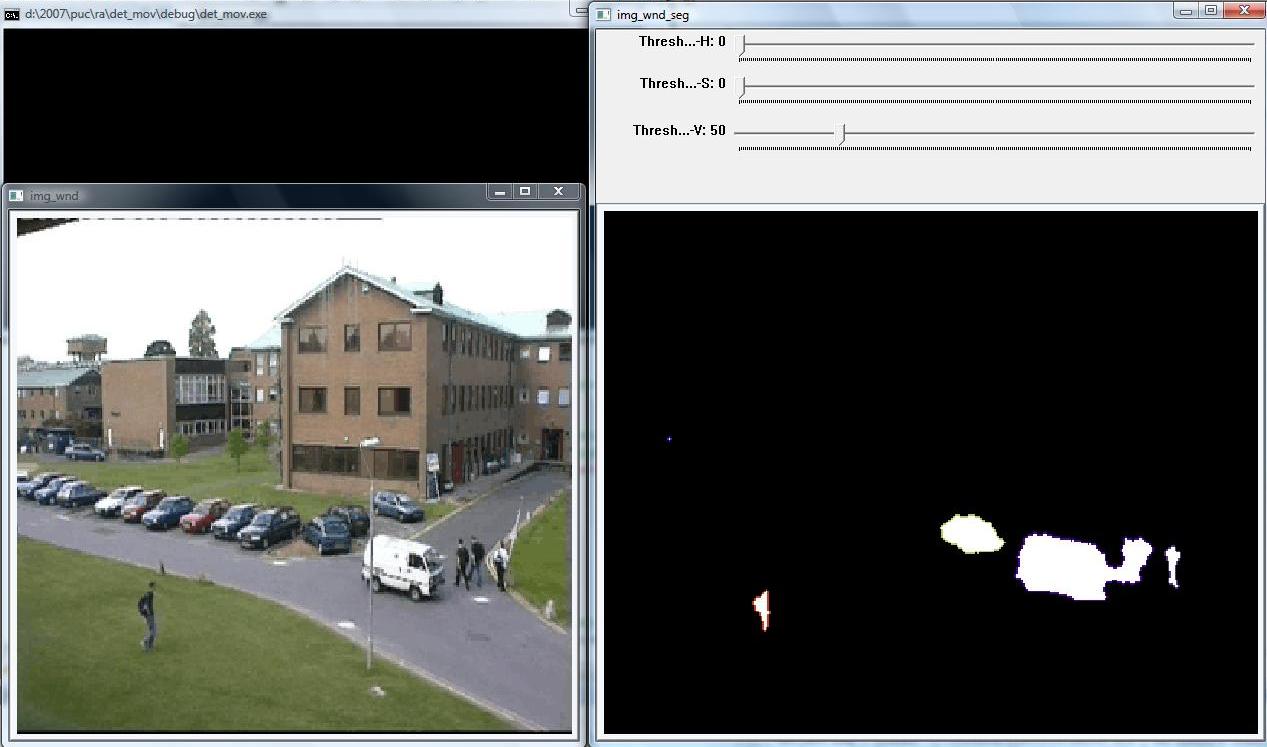
Video: PetsD1TeC1.avi
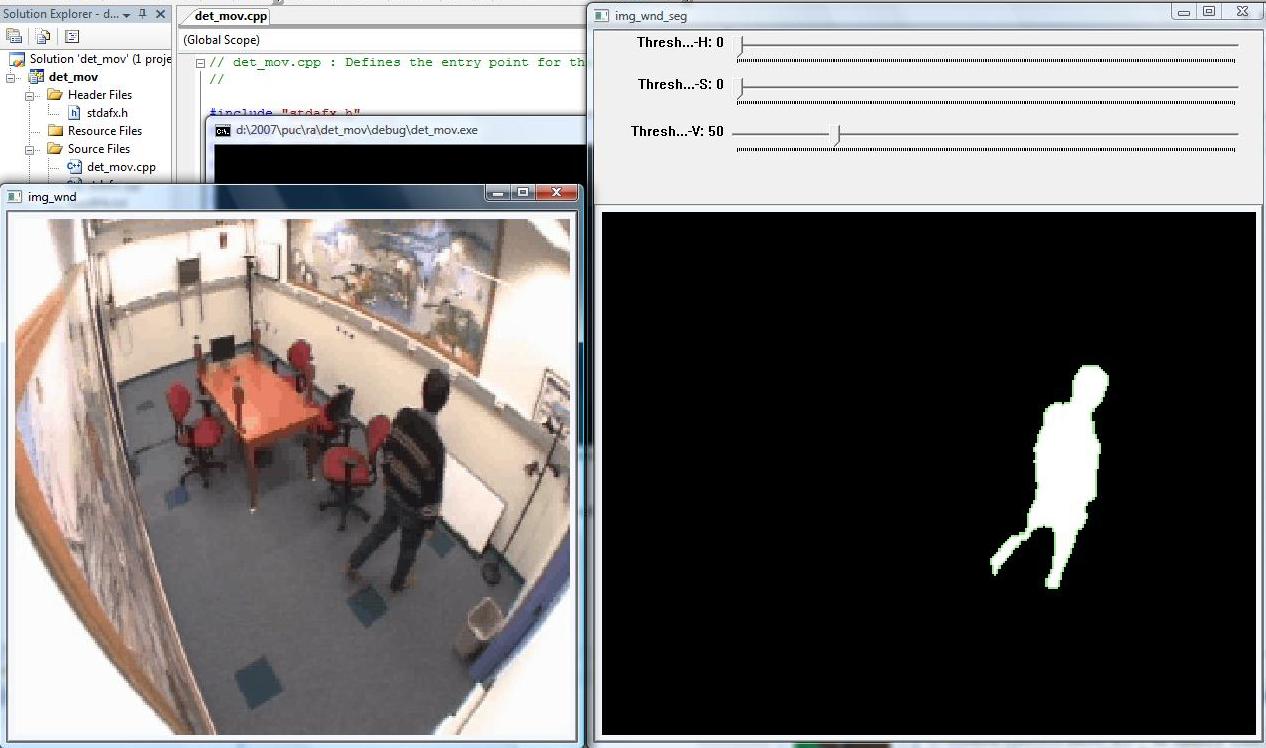
Trabalho 1 - Segmentação de vídeo
Aluno:
Dário Augusto Borges Oliveira
Trabalho: Programa para segmentar movimento em um video (arquivo-fonte)
Neste trabalho devia ser criado um programa que recebe um stream de vídeo (a partir de um arquivo ou vindo de uma webcam) e faz a segmentação do fundo em relação aos objetos dinâmicos da cena. Ou seja, um programa capaz de detectar os objetos em movimento ao longo do vídeo. O programa deveria utilizar a biblioteca OpenCV, desenvolvida originalmente pela Intel.
O programa consiste nas seguintes etapas:
· Criar duas janelas, uma com o vídeo de entrada e outra com o resultado do vídeo de saída. O díalogo de entrada deverá conter um “slider” para controlar um valor de “threshold” (ver segmentação de movimento). Esse vídeo de entrada pode ser capturado direto de uma webcam ou vir de um arquivo.
// Capture from a camera:
//CvCapture* capture = cvCreateCameraCapture(-1); // -1 for any camera
// Capture from a file:
CvCapture* capture = cvCaptureFromAVI("intelligentroom_raw.AVI");
//CvCapture* capture = cvCaptureFromAVI("highwayI_raw.AVI");
//CvCapture* capture = cvCaptureFromAVI("PetsD1TeC1.avi")
IplImage* img = 0;
IplImage* img_seg = 0;
//creates the windows
cvNamedWindow( "img_wnd_seg", 0 );
cvNamedWindow( "img_wnd", 0 );
//creates the threshold trackbars
cvCreateTrackbar( "Threshold-H", "img_wnd_seg", &thresholdh,
255, NULL );
cvCreateTrackbar( "Threshold-S", "img_wnd_seg", &thresholds,
255, NULL );
cvCreateTrackbar( "Threshold-V", "img_wnd_seg", &thresholdv,
255, NULL );
· Definir um número de frames para realizar o treinamento das características do fundo. Durante esse tempo, definir a média de cada pixel de todos os frames do treinamento. A quantidade de frames ideal para um treinamento depende do vídeo de entrada. Considerando o fundo bem estático durante a fase de treinamento um valor razoável para esse número de frames seria de 100 frames.
//defines the number of frames used to train the background
int numframesT=20;
/* Training the background */
for (int i=0; i<numframesT;i++ )
{
if(cvGrabFrame(capture))
{
//captures the image from the video
img_color = cvRetrieveFrame(capture);
//converts from rgb to hsv
cvCvtColor( img_color, img_hsv, CV_BGR2HSV );
//creates the hsv channels from a HSV image
cvSplit( img_hsv, img_h, img_s, img_v, 0 );
if (i==0)
{
//sets the backgroung as the first frame (*weight 1.0/numframesT)
cvConvertScale(img_h, img_hA, 1.0/numframesT,0);
cvConvertScale(img_s, img_sA, 1.0/numframesT,0);
cvConvertScale(img_v, img_vA, 1.0/numframesT,0);
}
else
{
//adds this frame to the estimate background
cvConvertScale(img_h, img_h, 1.0/numframesT,0);
cvConvertScale(img_s, img_s, 1.0/numframesT,0);
cvConvertScale(img_v, img_v, 1.0/numframesT,0);
cvAdd(img_h,img_hA,img_hA);
cvAdd(img_s,img_sA,img_sA);
cvAdd(img_v,img_vA,img_vA);
}
}
else
{
printf("Could not grab a frame\n\7");
exit(0);
}
}
//merge the hsv image
cvMerge( img_hA, img_sA, img_vA, 0,img_hsvA );
· Após o fim da fase de treinamento, cada pixel x de um novo
frame de entrada Ii(X) deverá sofrer uma segmentação em
relação a média representadas por B(x) em
relação à um “threshold” qualquer t (controlado
pelo “slider” da janela), respeitando a equação abaixo:
· Os pixels que satisfaçam a equação anterior
devem pintados de branco, caso contrário deverão ser pintados
de preto.
//segments the image acording to the three defined thresholds, and the estimated
background
for( int w = 0; w < img_color->width; w++ )
{
for( int h = 0; h < img_color->height; h++ )
{
sT=cvGet2D(img_hsvA,h,w); // get the (i,j) pixel value
s=cvGet2D(img_hsv,h,w); // get the (i,j) pixel value
if ((abs(s.val[0]-sT.val[0])>thresholdh) && (abs(s.val[1]-sT.val[1])>thresholds) &&
(abs(s.val[2]-sT.val[2])>thresholdv))
{
cvSet2D(img_seg,h,w,sIn);
}
else
{
cvSet2D(img_seg,h,w,sOut);
}
}
}
· Esse primeiro resultado deverá receber filtros de ruídos e filtros morfológicos (métodos de “erode” e “dilate”, por exemplo) com o objetivo de que o desempenho final do processo de segmentação seja ainda melhor.
/* morphologic operations of opening and closing to enhance the result */
cvDilate( img_seg, img_seg, cvCreateStructuringElementEx( 9, 9, 4, 4, CV_SHAPE_ELLIPSE),
1 );
cvErode( img_seg, img_seg, cvCreateStructuringElementEx( 9, 9, 4, 4, CV_SHAPE_ELLIPSE),
1 );
cvErode( img_seg, img_seg, cvCreateStructuringElementEx( 3, 3, 1, 1, CV_SHAPE_ELLIPSE),
1 );
cvDilate( img_seg, img_seg, cvCreateStructuringElementEx( 3, 3, 1, 1, CV_SHAPE_ELLIPSE),
1 );
· A última etapa será encontrar os contornos ativos e exibir cada um de uma cor na janela de resultado juntamente com a máscara conforme a figura abaixo.
/* Find the contours */
// image conversion from rgb to grayscale
cvCvtColor( img_seg, img_seg2, CV_BGR2GRAY );
// image thresholding to create a binary image
cvThreshold( img_seg2, img_seg2, 1, 255, CV_THRESH_BINARY );
// find the contours
CvMemStorage* storage = cvCreateMemStorage(0);
CvSeq* contour = 0;
cvFindContours( img_seg2, storage, &contour, sizeof(CvContour), CV_RETR_CCOMP,
CV_CHAIN_APPROX_SIMPLE );
for( ; contour != 0; contour = contour->h_next )
{
CvScalar color = CV_RGB( (double)rand()/RAND_MAX*255, (double)rand()/RAND_MAX*255,
(double)rand()/RAND_MAX*255);
/* replace CV_FILLED with 1 to see the outlines */
cvDrawContours( img_seg, contour, color, color, 1, 1, 8 );
}
//sets the correct origin so the image doesn't look wrong
img_seg->origin = img_color->origin;
//show the segmented image
cvShowImage( "img_wnd_seg", img_seg);
Resultados:
Video: PetsD1TeC1.avi
Video: PetsD1TeC1.avi